Wednesday, February 20, 2008

Tips and Tricks: How To Align Objects in Illustrator

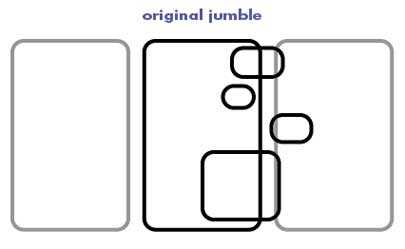
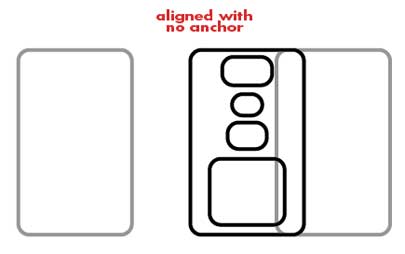
Here's a neat trick that I just learned in Adobe Illustrator. When I'm putting stuff together, I make liberal use of the Align function. It allows you to make sure your objects are lined up with mathematical precision, saving you the hassle of eyeballing the whole thing. But the problem has always been (or so I thought) that the align function takes the average horizontal position of all of the objects and aligns them all to that. That's great if nothing is integrated as part of a larger plan, but if you have placed one object perfectly, aligning other objects with it throws it completely out of whack. If I wanted to put all of these objects dead center in the panel, I could do that, but it puts that panel itself out of line with the other panels.


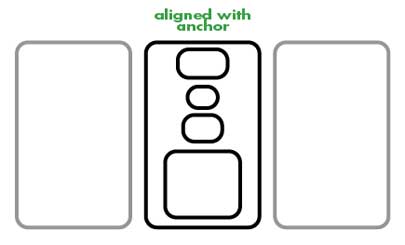
But don't worry. It turns out you can designate one object in the bunch that you've selected to be the anchor and make all other objects align to it. After you've selected all of your objects, single-click on the anchor (in this case, the middle panel), which will appear to do nothing whatsoever. Then hit one of the align buttons. Voila! They are all aligned to that one object.


This might seem to you like a monumentally insignificant post, but once I realized this, it practically changed my life. Not having to realign all of those panels saves me a huge amount of time.

Labels:

Tuesday, February 05, 2008

Tips and Tricks: Boredom and Laziness

Boredom and Laziness: Your Friends for an Improved Aesthetic.

They may seem like an unpleasant state of being and a negative character trait, respectively, but boredom and laziness and the forces behind them play a valuable role in an artist's growth. No, really!


Any time you ask people how to get better at any artistic discipline, they always hit you with the old "practice, practice, practice" saw horse. By the time someone has been told that ten times, they think, "yeah, yeah, I'll do that," and no longer hear that suggestion at all. They want to hear something interesting. I mean, practicing is BORING.

That's exactly why it's useful. Whenever you figure out how to do something logically, you are doing every single step and putting in every single line, and your drawing may look okay, but your overly-thought-out process is going to show in the drawing's stiffness, its tentative line, and its overall lack of confidence. Now, he next time you draw it, you might look ahead a couple steps and say, "Oh, those three lines could be smoothed out to be one long line" and then swoosh! you have one smoother, more dynamic, and more confident line in your drawing. What is that strange feeling that compels you to change your drawing process in order to make it more interesting? Aha, you guessed it: BOREDOM.

Boredom is a powerful force, and so when, instead of fighting against it, you leverage it and use its strength, you take some of the pressure off of your conscious mind. Forcing yourself into a situation in which you have two options-- be bored or create something interesting-- can result in some great ideas, drawings, stories, or what have you.


The other natural habit that practice makes use of is laziness. You may notice that when you see an cartoonist's style evolve over the course of many years, their work tends to take on a smoother, simpler quality. The early work tends to have a lot of wasted lines and extraneous detail that is dropped out once the artist gets a sense for exactly what is needed and what is not. Is he thinking consciously throughout his career, "should I keep this line? Should I simplify this style of rendering?" Almost certainly not. He's LAZY. He's drawing the same things over and over again, and he's getting sick of putting in every last line. He wants these drawings to look just as good, but to involve less work, so he organically developed a way to draw more simply. Our instinct to save ourselves some effort drives us to innovate, and those innovations allow us to spend less time and effort on run-of-the-mill illustrations, and focus our energy on creating something new.

Reinhard Engels, in his Everyday Systems website, posits that will is weak and habit is strong (he refers to it as the "800-pound mega-gorilla") and so the basis of all of his self-help programs he's created on that site is this: Leverage your willpower to make habit work for you. This works for the mega-gorillas of boredom and laziness, too. Put yourself in a situation where they are the forces that drive you, and you almost can't help but improve.

Labels:

Tuesday, January 29, 2008

Tips and Tricks: How To Come Up With Ideas

Everyone wants to know how you come up with ideas. It's certainly the least quantifiable aspect of creating stories. But while there are certain x factors that you could never really tell someone about, I feel like there are 10 basic things that if I try them all, I can get some decent ideas out of it.

How to come up with ideas.

1. Practice. I know, this is lame. But if you create things, draw characters, write stories, scribble down notes for comics or screenplays, you will get better at it. You will come up with ideas faster, you will notice what's good and bad about other people's ideas more clearly, and you will be able to refine a single notion, like a visual image or a line of dialogue, into a concept for a story without nearly as much heavy lifting.

2. List. Some time when you need to come up with an idea for something, just start listing every idea you can think of, even if it's not really an idea. Write lists of words, thoughts, lines of dialogue, lyrics from songs, objects in the room, random things that come to mind, and after about fifty of them, you might start to get some real gems. As you loosen up your mind, you start making connections between your fifth idea and your fiftieth idea, and all of a sudden, you're coming up with some cool stuff.

3. Write it down. Always have a notebook that you always put stuff in. If you're at a computer, send yourself an email. If necessary, write it on your hand. Don't wait. If you think that it's such a great idea that you'll surely remember it when you are over at your desk later, I must tell you that you are almost certainly mistaken. This goes double for dreams. You'll forget those in 30 seconds if you don't write them down before you get out of bed.

If you're nowhere near a computer, pen, piece of paper, digital recorder, or cave wall, and you're coming up with some real doozies, think of one word that represents the thought, assign it to a finger, then keep going. With luck, this real-world reminder (the finger) and its corresponding word will help you remember the idea when you get home so you can write it down. This sort of thing always happens to me when I go for a run, so it's good to have a way to remember up to 10 ideas.*

4. Do research. When I'm looking up information on, say, the middle ages, for, say, my comic The Replacement God, I also am finding about ten million ideas, not only for that story, but for completely unrelated stories and images that I might not use for ten years. It's nice also to feel like if you find something really interesting that doesn't quite fit into your current story, that you don't have to shoehorn it in; you can write it down, save it for later, and launch a whole new project out of it.

5. Listen to, and frequently mis-hear lyrics to songs. I feel like every time I listen to a song, particularly one where the lyrics are well-crafted, I'll hear a phrase or couple words that give me an idea for a story. Sometimes it's a story that would be related to the song, sometimes it's using the phrase entirely out of context. Sometimes it's not even what the singer says. Those are the best, by the way, because then it's an original idea, even though it feels like someone gave it to you!

6. See crummy genre movies. One of the great things about bad genre movies (sci-fi + fantasy ones in particular) is that they usually got greenlit based on some pretty decent idea. So even though they may be lousy in terms of an actual experience, they sometimes have an idea that, if you just took the basic concept, could be made into a cool story with a different setting and better dialogue. Don't steal ideas, of course, but sometimes you just happen upon a bare concept that gives you a million ideas, and then some joker just wastes it. Change the setting, change the characters, change the genre, and see if it doesn't look completely different while still being able to use the one good idea.

7. Remix concepts. One way to make great ideas that's pretty easy is combining two different concepts into one. Take an old story structure and put it in a futuristic setting. Take something small and make it big. Take something organic and make it synthetic. Those three templates cover nearly every science fiction story ever told. Combining two very different things is not only good kick-off point for ideas, it's also intrinsically fascinating to readers. What if a little lizard were a thousand feet tall? Boom, movie franchise.

8. Randomize. Draw a Pictionary card. I've mentioned this as a way to randomize ideas for a 24 hour comic, but this and other randomizers are great for juxtaposing two words that you never thought would go together. Another idea would be opening to a random page in a dictionary or novel. Do that a couple times and look at the words you have.

9. Do something mindless. I get most of my best ideas when I'm going for a run, going for a walk, shoveling snow, driving on the highway, or anything else where you kind of have to pay the barest bit of attention, but your mind can just wander. Just think about one thing, let it lead to another thing, and before you know it, you're thinking about something really weird.

10. Extrapolate. This may be the most important one of all. Most great ideas are actually just halfway decent ideas that someone extrapolated very, very well. For example, the idea around the Harry Potter novels: there is a secret population of wizards. Ho hum. However, once you start saying, "oh, then there are some wizards who are born to Muggles, some who are full bloods and hate the Muggles, and there's a secret wizard boarding school, actually several of them, and these are the classes they teach, and..." and so on. Getting good at this skill not only helps you create cool things once you have an idea to start from, it also helps you recognize a good idea when you see it. If hearing the idea makes your brain explode with ideas about "oh, then there must be this, and then there must be that, and these people could do this other thing...", then you know you've got a good one.

These are some of the ways that I've come up with ideas in the past. They're all basically the same concept, though: take the various random signals that come to you from the world and apply meaning to them with your mind. With practice, it becomes second nature, and you'll soon have more ideas than you have time in your life to execute them. Hooray for that.

*more than that and I have to take off my shoes, which is a terrible idea while running.

Labels:

Friday, December 21, 2007

City Pages: Twin Cities Rock Atlas


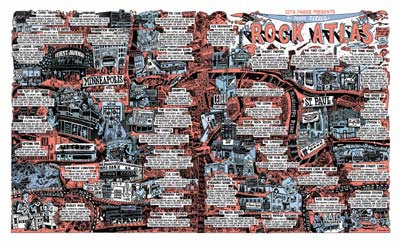
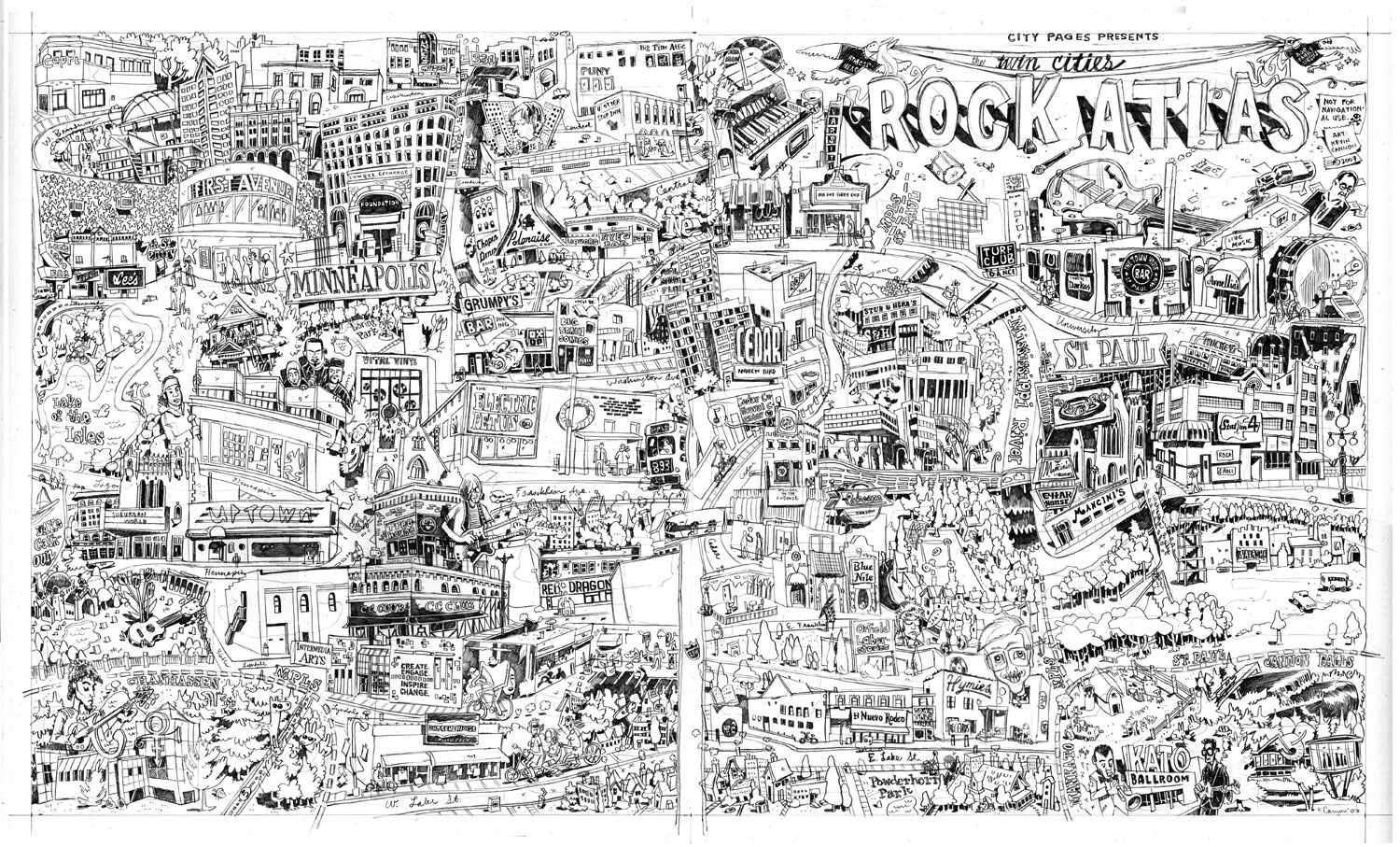
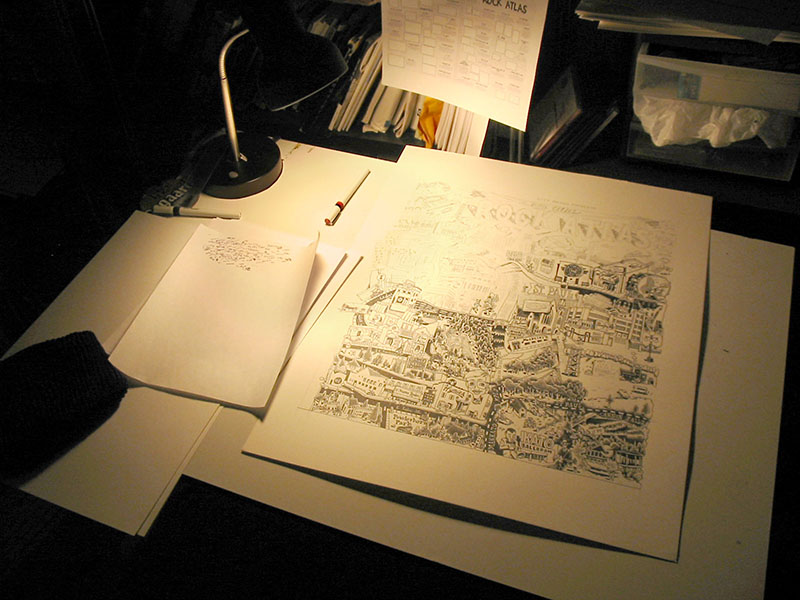
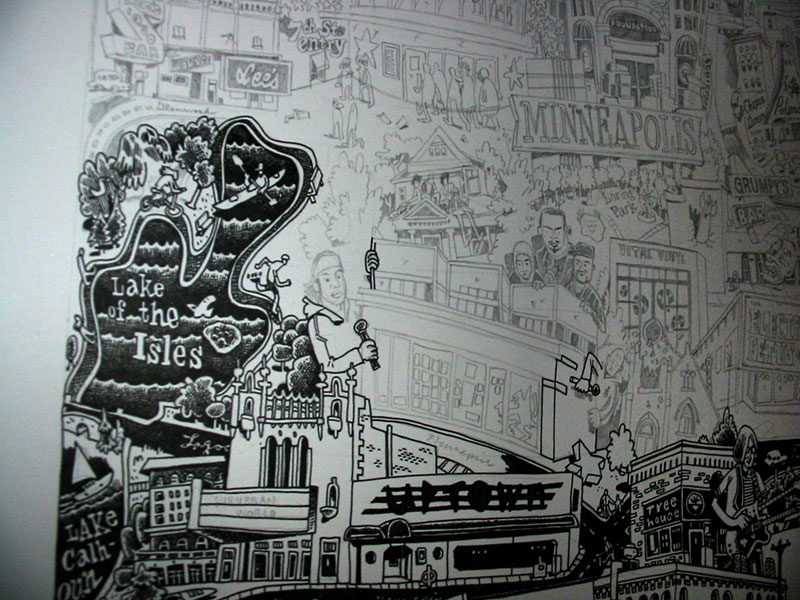
Between now and Wednesday pick up a copy of City Pages and turn to page 50 to be magically transported to a land of rock and roll. This map was a huge undertaking -- one that I'm thrilled to have been a part of -- and for fun I thought I'd jot down some notes on its production.

So ... here is way more than anyone should ever want to know about the Twin Cities Rock Atlas:


CONCEPT
Nick Vlcek of City Pages approached me for this project based on the style he'd seen in the Comix Issue in July. For the rock atlas, Peter S. Scholtes wrote captions for over forty venues around the Twin Cities, several of which had to be cut due to space constraints.

LETTERING
Drawing the map was easy compared to the front-end work, namely making sure that all of the venues on the list would fit on the map. I made an InDesign document with the dimensions (12 x 20.5") and pasted in the text from the Word document. A year ago I would have hand-lettered the whole thing, but fortunately we made some handwriting fonts recently (roman, bold, lowercase and title) with FontLab. Using the fonts allowed me to get the lettering part of the map nailed down on the front end, so there was no guesswork later. If I didn't have a font, I would have hand-lettered everything separately, scanned it in, and moved each caption around as a separate object in InDesign.

My main balancing act with the lettering was how to get it as small as possible while still making it legible. I learned from the Comix Issue that small lines tend to bleed on CP's newsprint. Nick and I wanted the captions to be small enough to be able to show as much art as possible, but not so small that everything's illegible, thus ruining the whole point of the map and disgruntling everyone who tries to use it for navigational purposes.* We eventually settled on something small but conservative. The main risk was with the addresses, which use the smallest font size -- the thinking being that the address is the least important part of the caption.


CAPTION BORDERS
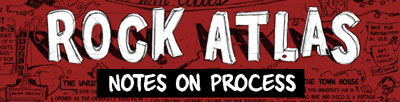
Initially I put huge balloons around each caption (see above), worried that black and white text, especially handwriting text, would get lost against the final artwork. The Comix Issue had used a lot of white space under the text, and that seemed to work well. The problem with the rock atlas was that with forty captions, all that white space on the edges of the captions added up. We eventually dropped the borders and brought the font size down, thereby clearing up space for more art.


VENUE PLACEMENT
This was complicated, trying to place these pretty disparate venues on one landscape template so that they made some sort of geographical sense, but ALSO find room for their captions. My first go at this had all Minneapolis venues on the left, and every thing else (title, St. Paul, and outlying cities) on the right. I would have liked for the title to be on the upper left but there were just too many Minneapolis venues to make that feasible. To make this initial set-up work I had to bunch up captions so that arrows were hiding under other captions to reach their destination. It was crazy busy. Thankfully Nick nixed this idea, and also wanted Paisley Park to be in the lower left so that it was more geographically accurate. Good call, Nick.

I made a layer in InDesign with lots of little boxes representing the venues (see above). Using blank boxes let me move them around without getting too precious about their placement or about how each venue interacted with one another -- I knew that level of magic would happen at the pencil stage. In retrospect I should have made the boxes more horizontal, or at least have known what all the buildings looked like before making the boxes. There's almost nothing vertical about Orfield, for example, but I didn't know it at the time.

Eventually Nick came back to me with a revised venue list which let me pull a few venues and their captions. I also stopped being precious about having all Minneapolis venues on the left and pushed everything from Cedar and east of Cedar to the right side. That worked out because I was finally able to put a caption next to each venue.


GOOGLE MAPS
One of the first things I did, even before making the InDesign file, was to plug all of the addresses into a personalized Google map. Turns out CP did the same thing -- good thinking, guys! Right off the bat I was able pick out patterns in the map, such as clusters of buildings that should be close to each other. For example, from an artistic standpoint I don't like that the Capri is isolated in the upper left, but it makes a lot of sense geographically.

PHOTOGRAPHS
The Google map also came in handy when I went out to take photos. The biggest mistake I made during this project was assuming that I would be able to find most of the reference photos online. Nope. Most of what I found online were indoor shots of the clubs (for good reasons) or outdoor shots that zoomed in so close on one part of the building (a cool sign for instance) that I didn't have enough context for knowing how that sign fit in to the rest of the building.

Anyway, I paid my price for procrastinating. I went out on two photographing journeys, two traffic-free Saturday and Sunday mornings from 6-11 am. It was FREEZING and there was a lot of snow (there would have been no snow had I gone out a week before). But worse yet, the Church was gone! The initial copy for the Church caption said that the building was in danger of being razed. Well, the copy had to be changed because the whole thing was gone. Fortunately I found a photo online, but it was only of the top of the church, which is why the bottom and sides are hiding behind trees in my drawing.

PENCIL PREP
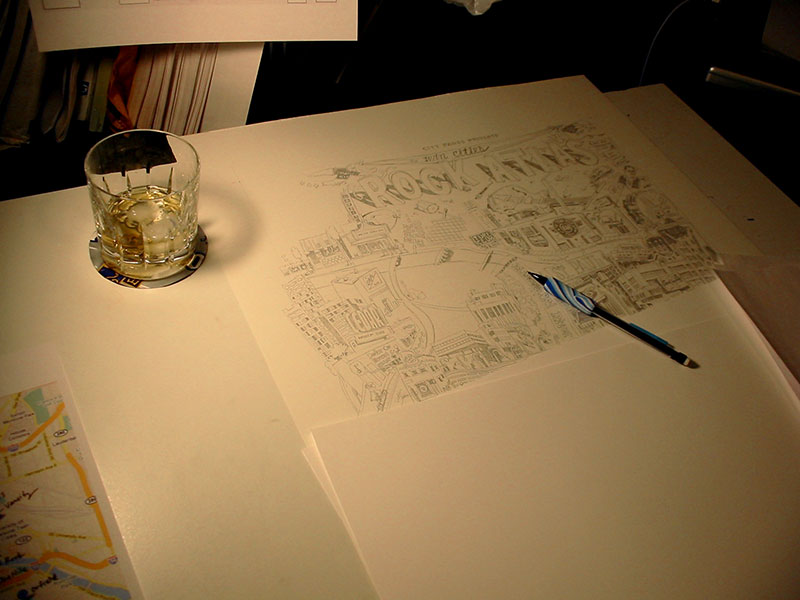
Finally, with 240 photos in hand (and many more from Google Image Search), I was able to start getting my hands dirty.

I wanted to draw at 150%, which meant a canvas size of 18 x 30.75". I bought a pad of smooth Bristol, 19 x 24", and divided my drawing in half. Nick asked me to leave a dead zone of about an inch in the middle of the map to allow for the magazine's gutter, which meant that no venues or captions were affected when I split up the art.

On the final art pages, I ruled pencil borders at 18 x 15.375".

Putting the final art pages aside, I ruled out two more sheets of bristol. This was for the rough draft of the map.


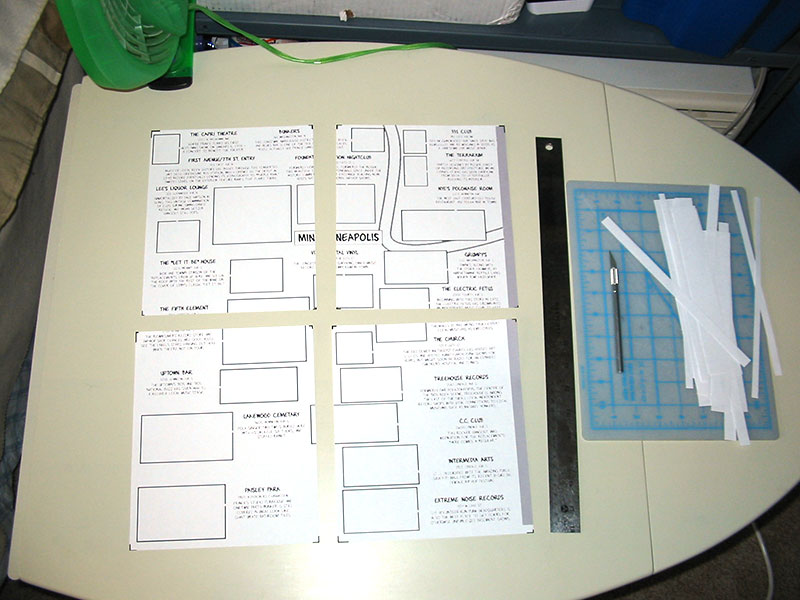
Next, I made a jpeg of the InDesign map, bumped that up 150% to final size, split that in half and printed it out. I was using a letter-size printer, so I had to print out the map in eight sections (above, left). I drew black boxes at the corners of each section so that lining them up on the page would be a breeze.

On the rough draft bristol pages, I taped down the oversize jpeg of the rough draft map (above, right).

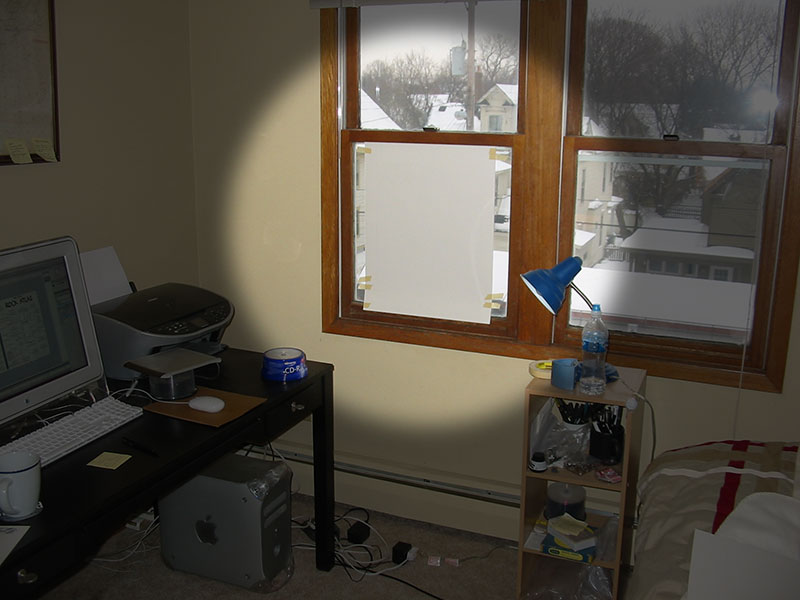
DIY light-table

One side at a time, I taped the rough draft of the map onto my ultra high tech light table, and then taped the final art bristol on top. I pencilled in the outlines of the boxes where the buildings should go, as well as the outlines of where the text would sit. Once all that was done, I had my final art pages ready, complete with the live areas for each venue. Now the fun begins.

Rough draft of the map:


PENCILS
TOOLS: Bic #2 mechanical pencil with multi-colored foam grip

Creatively, this is the hardest step. I set up my workspace so that I could easily flip through the photos on my laptop. I started at the bottom of each page and worked up, because I knew that often buildings and elements would hide behind the buildings below it. Essentially, the bottom venues became the foreground, and the higher up on the page a venue was, the more it sat in the background.
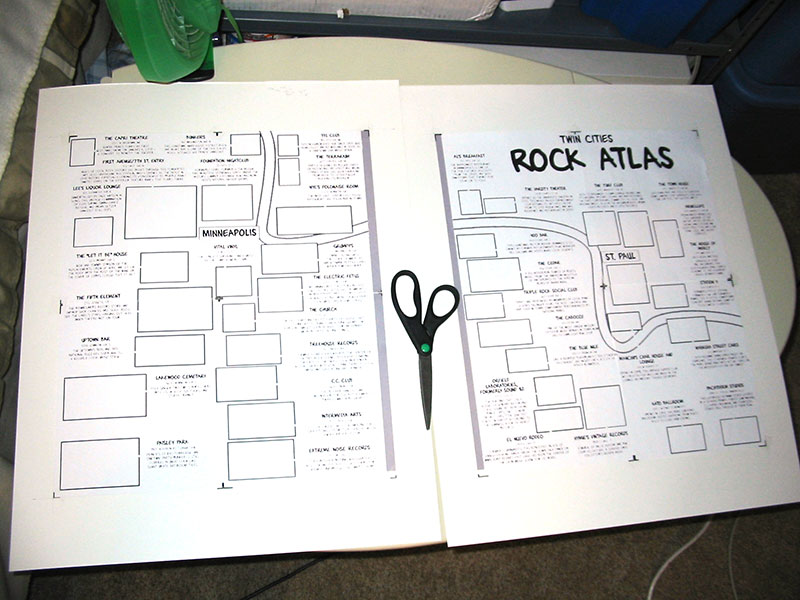

Workplace set-up

Without having a ton of room for each venue, I had to choose which details would make each drawing recognizable. So in most of the drawings -- which are essentially caricatures of the buildings -- certain elements are blown way out of proportion and other elements are left off completely. Some buildings had only one interesting face while others -- like Blue Nile and Intermedia Arts -- had great murals that wrapped around the whole building. I tried to squeeze in as much of the good stuff as possible.
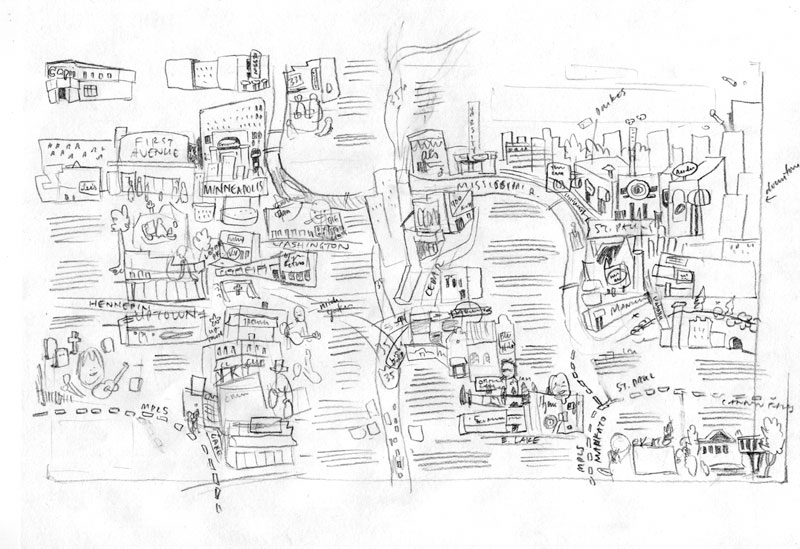
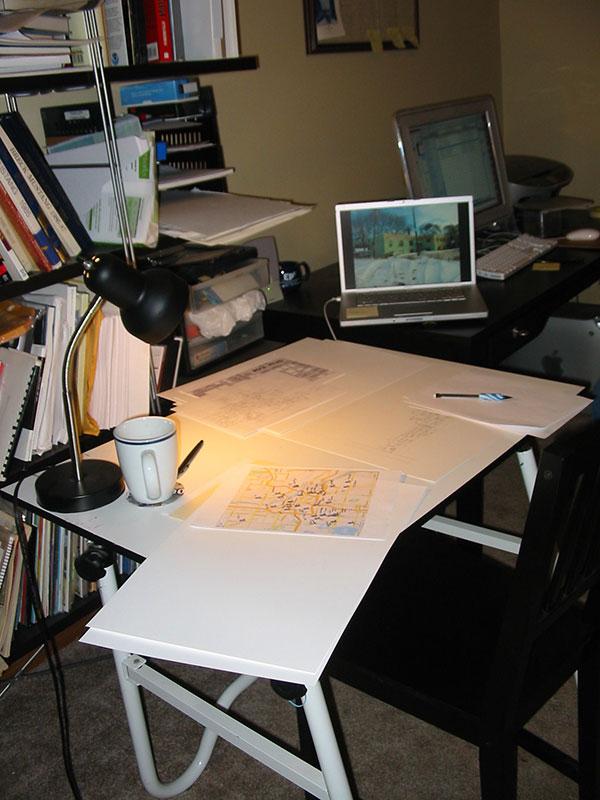
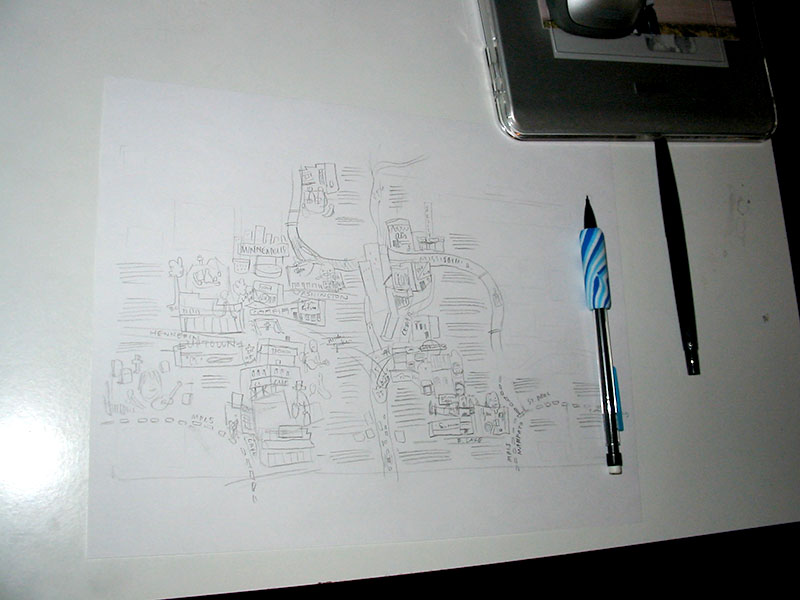


All told, pencils took about 3 days to do. Fortunately Nick got back to me with only a few minor changes.

INKING
TOOLS: Rapidograph, #2 (red) and #3 (green)

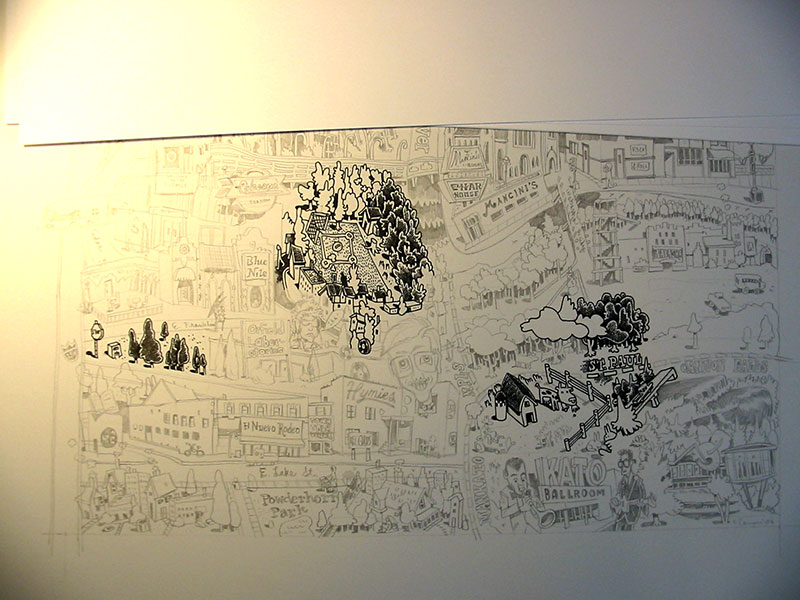
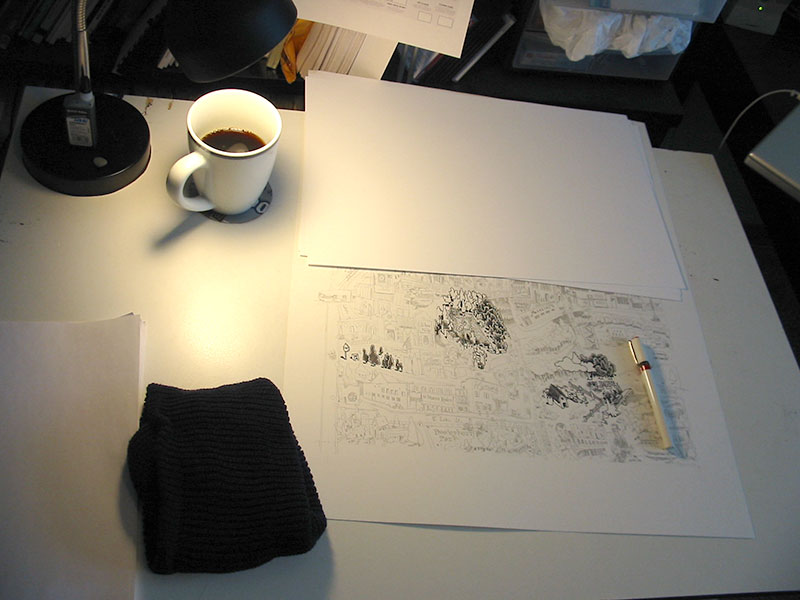
Inking can be tedious because most of the creative hard work is done, although seeing your pencils become final is pretty satisfying. One trick I've started using since Shanks is to have a wool cap (preferably dark blue) under my left elbow while I'm drawing. I got this one at the Rainbow in the Quarry for about two bucks.

All the linework was done using a #2 (red) rapidograph. I was using a brand new one because I broke my last one on Bob Lipski's project. Right away I could feel that I was using a new pen with fresh ink. Flow wasn't a problem at all. To help save the wire I used a green rapidograph to fill in any black areas and to do the heavy crosshatching on the river and streets.


COLORING
As much as I wanted to relax (read: collapse) after finishing the inking, I still had to scan and color the map, and I had only two days left until the deadline.

I scanned the art in piece by piece using an oversize scanner (ScanMaker 9800XL) and pieced together the bits in photoshop. For archival purposes, I saved a 1200 dpi bitmap version at original art size (150% of print size). Next, I dropped down the whole image to a print size 300 dpi CMYK file and started playing around with colors. I spent six hours specially coloring each venue with their actual palette before finally realizing that a blue/red scheme would look a lot better. Nick and I went back and forth about the red because while I wanted a deep red behind the black, like on Julie Doucet's "My New York Diary" cover, Nick knew that what I had would print really muddy. So we ended up lightening up the blues and changing the red to this lighter, salmony color. I'm not thrilled with the digital red, but the printed version looks great.

EASTER EGGS
Knowing that nearly half of the drawing would be covered by text, I took some liberties with the elements that appeared underneath the text. Some are buildings that I have a personal attachment to (Diamond's, Handicraft Guild) while the rest are just recognizable or make sense geographically.

Here are some parts of the drawing that you won't see in the City Pages version**:

My dad on the stone arch bridge The evergreen building on Snelling
Craig Finn sticker Craig Finn's guitar
The Metrodome, may she rest in peace My cousin's boyfriend's band
Local pub Quillan Roe's and Adam Wirtzfeld's band
The ultra-creepy "You Otter Stop Inn" mural The Handicraft Guild, 10th & Nicollet

For the FULL UNCENSORED version of the map, come see the original art at the Lutefisk C show at Altered Esthetics this May. Stay tuned this spring for more details on the show and the submission process...

* Not recommended
** Here's what I WISH I'd hidden in the picture.

Labels: ,

Tuesday, December 18, 2007

Tips and Tricks: Brush Care

If you've ever mentioned to someone that you'd like to be a cartoonist and that you're wondering about what art supplies to get, chances are someone has suggested to you the Windsor and Newton Series 7 brush.

Made out of hair that was gently and no doubt painlessly harvested from adorable Russian sable minks, it's unquestionably the gold standard when it comes to comic-book inking. But one of the tricks of coaxing beautiful lines out of your brushes is knowing how to care for them.


These brushes are usually in a locked cabinet in the stores so you'll have to ask someone to get them out so you can look at them. If they'll let you, dip the bristles into some water and flick it on the floor. Did the brush split? Don't get it. It'll split when you ink, too. If it keeps its point, it's good. Give them your money.

Our buddy Gene Ha draws notoriously tiny details with his brushes (yes, he uses the same brushes as everyone else, he just has a steadier hand) and here's his trick. He asks at the store if he can buy a set of three brushes in the original pack. They're shipped in airtight packs of 3, and if you get them like that, you can catch them before they've been messed with and exposed to light and air and all that. He then keeps the other two in a ziplock bag in the fridge with a wet paper towel to keep them moist. Seem excessive? Welcome to the world of Gene Ha.


Everyone has a different opinion about this. Here's mine. When I start inking, I set a clock in my head. The brush can't be out of ink or water for more than about a minute. It's stressful, but it really pays off in the long run. You also get a lot of inking done when you can't put down your brush for a sandwich.

I also always dip my brush in so that the ink goes up past the hairs and onto the metal. Every time. This way the ink in the brush always stays wet and it keeps the hairs of the brush all moving uniformly. I used to be afraid of getting ink inside the metal ferrule and so I would only dip the brush halfway down. One, this never worked. I would always, on about the 50th dip, dip too far down and everything was shot to hell. Two, even if I didn't make that mistake, the capillary action of the hairs would draw the ink up into the ferrule anyway. So I figured I'd just keep the brush wet and then wash it out really well. That's worked for me for years.


Brushes are hair, so you can clean them a lot of different ways. I used to use regular bar soap, then I used shampoo, then I used shampoo and conditioner (which was starting to feel pretty silly), then I found the perfect solution. "The Masters" Brush Cleaner and Preserver. Never use anything else. It's cheap and you can get it at any art supply store. It completely cleans out your brush and conditions the hair so that it keeps a perfect point.

By the time I'm going to wash out my brush, it's gotten pretty filthy, so the whole process takes a few minutes. I get plenty of the soap on my fingers, then work it into the bristles, always pushing towards the tip of the brush. I take care not to smash the hairs down and try to more or less just bend them back and forth, spreading them gently apart and just trying to get the hairs of the brush brown again. Repeat this a couple times, and when the soap is staying pretty much white, you've got a clean brush.

One more step. Once the brush is clean, put in a little more soap, get the tip to a fine, sharp point, and leave it in. It'll make the brush stiff and keep it from getting frizzy between now and whenever you use the brush again.


At art supply stores you can find these things that look like stretched-out springs on a stand, and you're meant to stick your brushes into them so that they hang upside down, all the better for keeping the points. I don't have one of those, but I probably should get one. When I store my brushes upside down, I usually tape them to the inside of an empty water glass. I use the same trick with a full glass if the doorbell rings and I have to stop inking and I don't want the brush to dry out.

Other brushes are pretty good as well, but they never come that cheap. Unless you're willing to do a lot of experimenting, you may as well stick with the gold standard.

Happy Inking!

Labels:

Tuesday, July 31, 2007

Cartooning Tips and Tricks: How to Straighten Your Drawing in Photoshop


Whoops, you scanned your drawing in crooked. Here's how to fix it:
(click the images for full screen shots)

1. Choose the Measure tool


2. Click and drag the Measure tool against a line on your drawing that SHOULD be flat. Here I'm lining it up with the bottom edge of the drawing. Click and drag on either end of the Measure line in order to adjust the line. TIP: give yourself lots of space on either edge of the drawing -- this helps with accuracy.


3. Go to IMAGE > ROTATE CANVAS > ARBITRARY...


4. Holy cow, Photoshop has calculated the exact measurement FOR you! Click OK.


5. You're done. If you want to quickly check whether it's straight, make a quick box with the Rectangular Marquee tool (press M on your keyboard).

Labels:

Tuesday, July 17, 2007

Cartooning Tips and Tricks: Favicon (Address Bar Icon)


What's the deal with those little symbols in the address bar of most websites, and how can I get one?

That's the question I set out to answer a few days ago. I've wanted one for a long time, but assumed it would be a frustrating and time-consuming endeavor. Turns out it was pretty easy. There are several good tutorials online, but here's Big Time Attic's quick and dirty summation:

1) Create your symbol. Size doesn't matter -- just make sure it's a square. Save as a jpeg.
2) Go to Favicon from Pics.
3) Click "Choose File" to select your image.
4) Click "Generate Favicon.ico."
5) Click "Download Favicon."
6) Unzip your Favicon folder and drag "favicon.ico" into your root web folder (wherever you keep "index.html" for your website).
7) In "index.html", place <link rel="shortcut icon" href="favicon.ico" > between your header tags. Example:

<html>
<head>
<link rel="shortcut icon" href="favicon.ico" >
</head>

And that's the bare bones of it. You'll notice (as of right now) that the Big Time Attic main site has a favicon, but not the blog site. When I was playing around with my personal site I found that putting the favicon in the root folder was enough, and that eventually all the subfolders "grabbed" the favicon and used it. I have no idea what's really happening, but I'm going to sit on the BTA favicon for a day and see if it "spreads" to the blog page. Wishful thinking never hurt anyone.

If anyone has any more advanced tips regarding favicons (or "flavorcons," as I like to call them) please let us know!

Labels:

Wednesday, June 27, 2007

Cartooning Tips and Tricks: Committing a Visual Subject to Memory

Let's say that twice a year you find yourself having to draw an elephant. Maybe last September you found yourself drawing a political cartoon and wanted to caricature the Democratic party. Then, a few months later, a six year old begged you for a "totally sweet" elephant (riding a snowboard).

If you're like me, you would have run for the nearest computer to do a Google image search. But the truth is, you don't always have a computer with you. So until someone comes out with an image phone, or "i-phone," we're all going to have to get better at committing to memory some of the things we could normally just look up.

The technique below could be described as "learning by humiliation." That is, you feel humiliated when you realize how little you know about something you've seen your entire life -- like, say, an elephant. Try this technique, and see if it doesn't help you stay away from Google image search...

STEP ONE: Pick Your Subject
Pick a subject, but don't look at photo reference first. Maybe it's an animal, maybe it's a person's face, maybe it's a cartoon character. You can see a vague image in your mind, but how well does that image translate to pen & paper?

STEP TWO: Draw Your Subject

Draw directly from your mind, without any visual reference around you. Try to draw your subject as accurately as possible. Think about each line while you're drawing it: which parts of the subject are you most comfortable with? Which parts are giving you the most trouble? It's important here that you really concentrate on and struggle with the unknown parts of your subject.

STEP THREE: Look at Visual Reference

Okay, NOW run to your computer and find the thing you're drawing. Print it out. Put the reference and your Step Two drawing side-by-side and compare. If you really concentrated on each line, you should feel three different things about different parts of your drawing:

"a-HA!" for areas where you had no idea how to draw it, but you struggled and tried to make an educated guess. You may have drawn it wrong, but now you know the right answer!

"WhaaaAAA--" for areas that you thought you were comfortable with, but it turned out you were off.

"NAILED IT." or "PAT ON THE BACK, KEV." for areas that you got right.


STEP FOUR: Draw the Subject Again

This may seem tedious, but put the visual reference away and draw the same exact subject. This time use the memory of your experience with Step Three. You should remember which parts of the drawing were correct, and repeat those, and remember which parts were off, and do your best to get them right this time.

STEP FIVE: Look at Visual Reference Again
Hopefully, you're spot on. If not, why not? Maybe the details are right, but the shape is off. If you're drawing a character, perhaps you got the eyes in the right spot but the line weight is all off.

NEXT STEPS:
If you're a perfectionist you may want to repeat Steps Four and Five until your drawing is beyond reproach.

For the rest of you, try repeating Steps Four and Five in a day, or a month. Notice what deteriorates in your memory of this specific subject.

Try a host of subjects. What do you consistently get wrong or consistently get right? See if certain kinds of subjects stick in your mind better than others.

BONUS STEP:
Simply to impress people (or piss people off), use these steps to memorize something extremely complicated and unnecessary. Maybe it's a portrait of Queen Elizabeth, or the complete rigging on a clipper ship. Who knows, maybe this completely random visual knowledge will win you points with the nephew ... or liven up a dull party.

Maybe it will save your life.

Labels:

Tuesday, June 19, 2007

Cartooning Tips and Tricks: Crosshatching

Crosshatching is the layering of planes of parallel lines on top of each other in order to create a gradient or texture in a drawing.


Crosshatching has an "old-fashioned" stigma, probably for good reason: drawing lines side-by-side, and then on top of each other, is a great solution to a problem inherent in pen & ink drawing and printmaking: How do you make a drawing tonal if all you have to work with is black and white?

With digital tools at our disposal, as well as relatively new products like Zipotone, Craftint and DuoShade, it's easy to see why crosshatching isn't considered cutting edge. However, I don't personally believe that a technique in itself can be old-fashioned; I think that comes out of how the artist uses the technique.

Below is a primer on crosshatching for the beginner or for those who want to hone their craft. Professionals -- we'd love to hear your advanced tips and tricks in the comments!

Styles of Crosshatching
1) Tight, accurate lines. Plane 2 is arranged at 90 degrees, plane 3 at 45 degrees.
2) Organic lines. Gives a softer feel.
3) Fast, wild lines. Energetic and frantic.
4) Lines that follow the contour of the surface.


Moire Pattern
When an overlapping plane doesn't have much of directional shift from the plane below it, you can end up with an effect like below. It looks jarring and will take attention away from your drawing.


Contours
When drawing a 3D object like a skull, do you keep your lines straight or follow the contours of the object? Examples:


Gradients
Two kinds of gradients below. On the left, the planes of lines end abruptly, in chunks. On the right, however, there is a greater attempt to smooth the transistion through the use of small lines that "dissolve" from one plane into the next.


Consistency

There is no right way to crosshatch, but being consistent in whatever style you choose can go a long way towards making your work look competent.

Consistent line weight. Keeping a steady line is easier with an inflexible tip pen like a rapidograph. If you're using a flexible crow-quill nib, however, keeping steady line weight will be a chore.


However, consistency and a changing line weight can go hand in hand, but takes concentration:

Labels:

Wednesday, June 13, 2007

Tips and Tricks: Writing for Comics

So you want to write comics, but you can't draw? No problem. You want to write comics but you don't want to think visually? Problem.

Most comics these days are written as full scripts, with the panels broken down, described, and dialogued by the script writer, which puts him or her in the position of author/director, controlling the pace of the story and the general experience of reading. If a writer is in that all-important position, he needs to think visually about the way the story is playing out, or else he is cheating both the artist and the reader out of a satisfying experience. So here at Big Time Attic, we have a stripped-down, basic primer on how to write comics and maximize the experience both for yourself and for your collaborators. And that's what will make good comics, too.

1. Think about panel layouts. You have to really think about what the reader will be seeing as he or she reads the story. What is the pacing? Where are the big revelations? Who is the focus of the narrative? While any good artist will add an atmosphere that will help all of these things, the writer of a comic has to give him something to work with. A good panel structure will make art more effective and easier to read, so it's good to have a plan as you write your script.

a. Use a standard layout for most of your story.
These are two good templates to stick to.


Action-heavy stories work well with the size of panels in the 6-panel grid, whereas denser, more dialogue-heavy stories are more at home in the smaller panels. This is not to say always use these pages; you should adjust them as necessary, putting a panel the width of the page in the top tier to show a surprise, or one 2/3 the width to show a few more characters or more background. And you should throw in a splash page here and there, sure. But the point is-- if you keep to a reasonable template for your panels, you'll do two things: regulate the pacing of the story so that you slow the readers down and let them get absorbed in the characters and plot, and set them up for the big KA-POW panel that you've been saving up for that page turn.

b. Try to put surprises on the page turn. It's a rare comic that can effectively put a surprise at the bottom of a page. People instinctively scan a page before starting to read, and if the surprise is a visual one, or in a big panel, they're sure to have it spoiled for them before they read the set-up. If you have it on the next page, or better yet, on the page turn, you'll get a lot more of the reactions you're hoping for.

c. Don't put more than 9 panels on a page. A lot of writers will try to cram too much on each page, both in each panel and in the number of panels. Unless you're drawing the comic too, never put more than 9 panels on a page. And if you have nine panels, put them in the 3x3 grid. Anything smaller than that is just not going to hold the information you want it to.

2. Know the four types of panels. As mentioned in this post, there are basically 4 things a panel can communicate: Scale, Relative Position, Emotion, and Detail. These will basically get you through most comic storytelling problems, and you should have all types in your stories.


Think about every panel as serving one of these purposes, and keep in mind, you shouldn't count on a panel having more than one purpose. The artist may be able to put something in there, but if, for example, you have a wide shot of a guy standing in a line and you want to show that he's angry about it, you'll want to cut to a closer shot of him to get his facial expression.
Don't get too caught up in thinking about what purpose each panel is serving, but these are things you can consider if you're feeling like you're stuck.

3. Most importantly, create layouts. The truth of the matter is, to write a comic, particularly in full script form, you need a sense for what the comic is going to look like. You also need to know what can and can't fit on a page. For this, you need to create some layouts. The method I like to use is this one.
a. Download and print out this template. Basically, it's a set of crop marks that looks like this:


It will give you guidelines for a dividing the page in thirds or fourths, horizontally and vertically, with wide, short 1/6th page panels thrown in there. Its approximately the size of a standard comic book after it's been printed. This is important because if anything is too small or illegible on this page, it will be in the final comic, too. If you're too wordy, you'll start realizing it as soon as you start writing it in those word balloons.

b. Create staging with these basic tools. You can't draw? Don't worry, we're not talking about really drawing. You just need to be able to draw:


It's as easy to draw as a stick figure, but it does a far better job of approximating what will be in the panel. Now, once you draw out some borders (I did this one in ink, for clarity, but normally I just rule them with pencil) you can draw your little people talking to each other. As I mentioned in this post, remember that the horizon line is eye level. Most panels are going to be at more or less eye level, so you should generally put your people's heads at the same level, on the horizon line, no matter how far they are from the "camera".


When you look at layouts, especially if the shots are not terribly innovative like this one, you may think, "Big deal. I can get that across in a script." That's true, you can. But when you do this you know how much space your word balloons take up, what order you look at the images (1st word balloon, 2nd word balloon, back of head, face, 3rd word balloon), how tight the panel is on someone's face or certain details, and absolutely most importantly, how well the comic reads as a comic. All of a sudden, you know that the story is too wordy, or that there are too many small panels, or that the dialogue reads weird in balloons even though it sounded great when read aloud.

c. Let the artist take care of the tough ones. Now, not all panels are going to be like this one. Really, anyone can draw two people standing in a room, at least so that you could guess what it was. But if this is the big reveal of your characters walking across a rickety bridge into the cavern holding the giant steam-powered steel zeppelin floating over a pit of lava, just let the artist handle that one. He'll have a better idea on how to frame it anyway. But if you have a panel set aside for it, you'll at least know how big it will be when printed, and then you can have a far better sense for how much information and detail you can reasonably ask for.

4. Let the artist alter the plans.
This one's important. You're not necessarily doing these layouts so that the artist will slavishly follow them, but rather so that you know what to include and leave out, so that you know what the final comic will basically look like, and so that you know what experience you're giving to both your collaborators and your fans. Artists know comics, and they know comics storytelling (if they don't, you'll really be glad you made these) and they frequently have excellent ideas on how to get a story across. Defer to their judgment, not just because they might know better, but also because no one wants to be the jerk who gets all over everyone's case when you're supposed to be done.

Good luck!

Labels:

Thursday, May 31, 2007

Comics Tips and Tricks: Create Your Own Handwriting Font

Zander and I are staunch advocates of hand-lettering, but that doesn't mean "font" has to be a four-letter word.

If you've got nine bucks to spare, consider building a font based on your hand lettering. While we wouldn't recommend using it for your next graphic novel, consider these scenarios:

COMMERCIAL WORK
Try using your clean, clear handwriting font on commercial storyboards, especially if you're working at a stage where the design department hasn't decided on the final font yet.


LAYOUTS
If you have to turn in layouts or sketches of your next comic or graphic novel, consider using a font version of your handwriting instead of quickly scratched text or empty balloons. The publisher will get a better sense of what the book will end up looking like and you can play around with varying balloon widths.

SHEER LAZINESS
So your aunt in Dubuque wants a "cartoony" invitation for your cousin's Spiderman-themed birthday party? Since your entire audience for this project will consist of people who will be fooled by your hand-lettered font, why not use it? There's nothing wrong with phoning it in once in a while.

THE GIFT THAT KEEPS ON GIVING
Speaking of your Aunt in Dubuque, why not make a font of her handwriting and give it to her for Christmas? I think custom fonts defintely fall under the "Say -- I didn't even know you could do that!" category. And with a ttf format, she should find it pretty easy to load on her Dell.

After a very quick google search we found fontifier, a fast and easy way to make a true type font for your use. Fontifier has you write out the alphabet on a specialized template, which you then scan in and upload to their site. Their compu-bots make a font out of your sheet in less than a minute.

Some highlights:

  • Only $9. PayPal or credit card. Cheap enough that you can make several fonts, or even several drafts of one font for less than the price of a night on the town.
  • Flexibility with customization. The font I made is all caps, so on the template I put uppercase roman as "lowercase" and uppercase bold as "uppercase." Also, want to draw a smiley face, or something not on the template? Try putting it in place of a character you may not use, like the British Pound.
  • Works on mac and PC.
  • Their terms of use says all ownership goes to you. So unless the fontifier people are big jerks, I don't forsee them selling your handwriting on the black market.


A note on the template: I wrote all of my letters on graph paper first, sometimes printing an individual letter two or three times until I got it right. Then I scanned it in at 600 dpi and dropped my best letters onto the template in Photoshop. (I had up-res'ed the template to 600 dpi as well.) When I had my template finished I dropped down the image size to 150 dpi or so on bicubic.

There are other make-a-font programs out there, but they seemed either too DIY on the programming end or prohibitively expensive (for recreational use, anyway). Zander and I aren't getting any cash from Fontifier, so if you know of other good programs, let us know!

Labels:

Tuesday, May 01, 2007

Comics Tips and Tricks: How to Copy Your Pencil Mini-Comic

A friend of mine is a middle school teacher who had a student create a mini-comic in pencil, and wanted advice on how to reproduce it. The mini-comic is 8.5 x 5.5" (letter size folded) and drawn in pencil.

As a side note, I think handing kids a pre-folded, pre-stapled blank book is a great way to start drawing comics. The pages are all in order and you can't tear up a page and start over. Plus, the fact that your blank book is already stapled and folded makes it seem "real" (as opposed to drawing on a bunch of loose sheets of paper).

So, let's say you have a 12 page mini comic (that's 3 sheets of letter-size paper, drawn on both sides), drawn in pencil, and you want to make 20 copies for your friends. How do you do it?

Using a Photocopier

1) take out the staples
2) Do some tests copies while adjusting the exposure on the photocopier. Find the setting you like.
3) Make double-sided copies of your double-sided artwork.
4) Collate and staple.
5) Fold down the middle. I like to fold once with my fingers, and then I use some hard plastic (like a small white-out bottle) to press firmly on the fold. This gives the book a hard, crisp fold.
6) For fun, sign each of your comics and write 1/20, 2/20, etc.

Using a Desktop Printer

1) Scan each full page in grayscale at 600 dpi.
2) In Photoshop, go into "Levels" (command-L or apple-L) and adjust the sliders until you get an image quality that you like (your initial scan will probably come in looking very light. Levels will darken it up).
3) Remember your Levels settings (the three numbers at the top of the window) and use those same levels on all the other pages.
4) In Photoshop1, go to "Image: Canvas Size" and make your canvas size exactly 8.5 x 11 inches.
5) Make sure that your image is centered on the page.
6) Save as tiff. "Tiff" is an industry standard for archiving artwork, and can be read on all computers. Establish a naming convention that will help you remember which two pages should be printed back-to-back. E.g. minicomic_pg01_sideA.tif and minicomic_pg01_sideB.tif.
7) Burn files onto a CD.
8) Now you can print your artwork on any computer2. You just need to remember to print the pages back-to-back, which will require printing sideA, then putting sideA back into the printer (upside-down, usually), and printing sideB.
9) Staple and fold!

1 Don't have Photoshop? Look for the "Brightness/Contrast" settings on your scanning software and adjust your artwork after the prescan.
2
600 dpi may be too large a file size for your computer. In that case, go to "Image Size" and reduce your artwork to 300 dpi. In the Image Size window, make sure your resize setting is "bicubic" or "bicubic sharper."

Labels:

Tuesday, April 24, 2007

Tips and Tricks: Cheating with Perspective

Every art student at one point or another learns to draw in one- or two-point perspective, and depending on how long you study it, it can get pretty overwhelming. Drawing out every line to the horizon and mapping out how far apart evenly spaced things are from one another as they recede-- it's exhausting! And worst of all, the mathematical precision of really doing the perspective right is almost always (particularly if you are imprecise, like I am) runs counter to your intuitions about aesthetically pleasing panel layouts.

Now, certainly there are times in which you have to really do it right. Cityscapes, roads, massive shelves of books, cars, etc., those panels all really need you to take some time and figure it all out. But what we're talking about today is the other 85% of the time-- when all you need is for things to look right enough. That's where the cheating comes in.

Getting perspective right can be a thankless job. If you nail it, no one notices, but get one thing wrong and your whole panel goes kerflooey. What we need to do is make a believable environment without having to get out the yardstick.

One: The Horizon Line is Eye Level

When you're drawing a lot of panels and you want to keep them looking basically structurally sound, one of the best things you can remember is this one simple fact: the horizon line is eye level. If you are looking horizontally, and you will find that most comic panels more or less are, the horizon line is at your eye level, and so it will cross everything at that level. Say you are 5'6". The horizon line will cross everything in the panel at five feet. Is someone much taller than you? Then it crosses them at the chest. A building in the background? About 3/4 the way up the door. A hobbit? Way above their head.


But apart from a few outliers, most people in a crowd scene, for example, will have their heads more or less right on the horizon line. This is helpful from a layout point of view because then all of the people's heads that you need to look at are lined up neatly in a row, anchoring the panel and making it much easier to read.

Two: Don't Worry About the Vanishing Point

Perspective books always talk about the vanishing point, and while that's important if you want your perspective to be bang on perfect, what I find is more useful on a daily basis is just worrying about whether things go basically up or down as they recede into the distance. If they are above the horizon line (eye level, remember), they will go down as they recede. If they are below it, they go up.


When drawing a room interior like this one, in my experience, it can be counterproductive to really extend the lines all the way to the horizon, which would put the vanishing point way off the page. I like to instead just imagine the angles of horizontal lines on the wall as simply getting shallower as they come toward the horizon. The picture on the wall, for example, has its lines going in the same directions as the top and bottom of the wall, just less extreme.

You'll notice I didn't use a ruler for this panel. Some people would be horrified, but I find that it's so much easier to do it like this than by ruling it out. Besides, once you start ruling things, everything that's not ruled starts looking bad, and you have to make every line straight, and every oval perfect, and quite honestly, then you will want to quit and go play video games.

Three: Putting It All Together (And A Trick!)


You will find that anchoring your people and objects to a horizon line will immensely improve your panel layouts. People will look much less like they are floating around, and two people talking will look very engaged in what they are doing, rather than two images just cut and pasted into the same panel. Also, a scene which has a horizontal line of people that are more-or-less the same height going across it can have a similar calming effect to a panel with an actual horizontal line, which is nice if you want a scene to be relaxed, despite having a bunch of people in it.


One trick that is used very often to great effect is drawing heroic characters from a low point of view; that is, putting the horizon line at about their chest level, as if we were only about 80% of their height. Now, when you see one single character like this, with no background or other characters around him, you don't really get the effect, but as soon as you put in some other people, or background, you really get it. That guy's big!

Four: Testing your work.

Much like all things with comics, the best way to test your perspective is, first of all, does it look right to you? Second, does it look right to your friends? Third, does it look right to an art teacher or professional artist? Fourth, does it look right to Gene Ha? If the answer to any of the first three are no, then you should definitely fix it right away. If it's the fourth, well, then you've probably been following this guide to a T.

Five: A Few Other Cheats


Models: A few good plane and car models are nice to have around-- even Matchbox cars are pretty useful, considering how cheap they are. Sometimes it's useful to take a photograph of them from the right point of view and work from that, as it makes it easier to get the perspective right.

Photographs: Can't beat 'em, if you're drawing the same building from the same perspective. Do that too much, or from photographs that you didn't take, however, and people will notice.

Sketchup: Google Sketchup is a fantastic free 3D modeling tool that allows you to create environments relatively easily and then texture them, light them, and rotate them to get just the angle you need. You can also download models people have created of buildings, cars, and anything else you need to get just right. It's cheating at its very best!

Labels:

Tuesday, April 17, 2007

Tips and Tricks: Desire

Scott McCloud came to town recently, and as part of his talk at Dreamhaven Books, he mentioned that the thing he is obsessed with now (and as we know, his obsessions can be rather intense), rather than being comic storytelling-related or technology-related, is story-related.

Every story begins at the beginning of a character's desire, and ends at the resolution of that desire.

Not the most earth-shattering notion, and I'm sure that if you've thought about writing at all you've come to a similar conclusion yourself. However, it made me think about a post I made a few weeks ago, Emotional and Logical Storylines, and the point that I was trying to make about Emotional storylines is basically summarized in that one sentence. In fact, to my mind, this notion represents the fundamental concept in creating a story.

As sympathetic human beings, we relate to a person's desire. We all desire something, and we want to help people we like achieve their desires. The presence of a likable character with a palpable desire for something is the nucleus of interest around which all stories revolve.

Similarly, it's a useful acid test for a story that seems to be losing steam. Are we still working toward the main character's goals? Does he or she still want that thing? Did he ever really want that thing in the first place, at least any more than anyone else? If so, why?

Stories in which everyone is chasing after an item that ultimately turns out to be worthless are a perfect example of why it's desire that makes stories compelling. It's the want that makes the story move, not the thing itself. And the fact that the item is worthless often helps to reveal the reasons that each person chased it, and therefore, reveals something about their character: always a plus.

Next time you write something, think about what your main character wants. Think about what your secondary character wants, think about what that guy standing there in the background wants. All of a sudden, you'll find yourself being pulled through the story and plot elements that seemed pale and perfunctory will come alive as they help or hinder your hero get where he or she is going.

Labels:

Tuesday, April 10, 2007

Tips and Tricks: Starting a Project

One of the hardest parts of being creative is actually getting started on a project. A lot of people who consider themselves to be creative have a lot of ideas floating around in their heads, but they find it hard to actually get going and put it down on paper. I have had this problem for most of my life, but recently I've thought about the projects I've done in the past that made me feel the most creative and tried to put together some of the things they've had in common, both things that I've done and things that have been forced on me.

Envision the Project

The second step in every project, after the general idea, is how you are going to communicate that idea. Will it be a novel, a comic book, a video game, a poem? If it's going to be a comic book, for instance, how long do you want it to be? How big do you want it to be? Color or black and white? On paper or online? Self-published or published by someone else? Try to picture what the finished project will look like in your hands. Think about the size of the pages that you've decided on; how much art fits on those pages? Think about the number of pages that you've decided on; how much story fits in that number of pages? Think about the incidental things-- the front cover, the inside front cover, the back cover, the inside back cover. Are you going to make it a wraparound cover? Are you going to put a list of the characters on the inside front cover? Are you going to put in sketches on some extra pages?

Obviously, not every one of these questions needs to be answered or nothing would ever get done, but it's good (and rare, in my experience) to have a sense for what the project is going to be like, at the very least.

Set Parameters

Sometimes these are set for you by your choice of medium, but oftentimes, when working on your own projects, there is a sense of infinite possibilities for any work. While that has its upside, it can be crippling when it comes down to the nuts and bolts of getting things actually done. In this day and age, with computer colors, print on demand, online publishing, non-standard formats, and the convergence of media, the idea of formatting to the requirements a certain medium seems awfully quaint. But you know what? You have to commit sometime, so let's hear it, champ. You may decide you're going to do a ten-page story. You may decide you're going to do a 24-hour Comic. You may decide you're only going to use a certain kind of pen. You may swear up and down that you're going to do one comic strip a day for a year.

Whatever it is, it's your track now, and for all the times that it will feel constricting, there will be just as many times when you are so glad that you have a clear path to funnel your energy, be it high or low, into.

The genesis of the 144-hour Graphic Novel Project was built around wanting to create a graphic novel in a year and fit it into the schedule of someone who works full-time. Therefore, a number of tight parameters had to be set. We chose to emulate the 24-hour comics' page-an-hour pace, which demanded such things as simple tools, a very very loose story outline, working at published size, and for me, relatively unvaried page layouts. These rules, rather than limiting the creativity of the project, shape it, and make it into what it is.

Set Aside a Time

Along the lines of setting parameters, it's important to set aside a failsafe, foolproof time that you will always be able to work on the project with no interruptions. This is important. This deserves a time in your day. If it's every day before you go to work, or every day when you come home before you eat dinner, or an hour before bed, or during lunch. If you set it up, let people know what you're doing, and follow it, then you end up getting the work done. If you choose poorly (e.g. at a time when you have other things going on) or fail to make it a priority (do everything else that comes up instead of work on your project), you will not. Obviously, things come up, but it's important to think about that as a reason to carve out extra time here and there to finish that month's work so you can go into the next chapter with your head held high.

Do NOT fall into the trap of "just working on it when I have the time". That makes it your last priority. Unless you have absolutely nothing going on in your life, I'm sorry to say it will not work.

Don't Do a Bad Job

This may seem obvious, but it's a very fine point. A lot of times when you have an idea in your head for some project you want to do, you expand it in your head until it is so great and wonderful that nothing you could do (at least the first time around) could ever match it. This keeps you from doing it because you love imagining it in perfect form so much. This is Brain Crack.

Now, that's not to say that you should just throw every undigested idea you ever have out there for the world to see, but what I find to be useful is this simple guideline: Don't Do A Bad Job. Decide what you are going to do, set your parameters, put aside some time, and then try your very best not to suck. If that's what you're focusing on, you'll be remembering to develop your characters, have your dialogue sound good, choose your panel design carefully, and draw your characters consistently and well. Worried that the work might just be okay, and not pure genius like you hoped? I wouldn't. Just like running at an even pace throughout the race puts you in position to sprint and win at the end, taking care of the basic, average stuff puts you in the position to have moments of genius come through when they will be most appreciated.

Come on. I know you've got it in you.

Labels:

Tuesday, April 03, 2007

Tips and Tricks: Emotional vs Logical Storylines

Along the lines of the Story Triangle, this is another shorthand that I like to use when writing. It's something easy to keep in mind, and it really helps keep stories interesting without losing focus.

Every story that you read has both a logical storyline and an emotional one. For the purposes of this discussion, let's think of the logical story as the framework of a highrise building-- the beams and girders. The emotional storyline is the walls, paint, carpet, and decorations. Obviously, to make a building that anyone wants to live in, we need both to work properly. Not enough emotion and we're walking around in a construction site with howling winds and rain pelting us. Might be interesting to see how the building is put together, but you wouldn't want to spend much time there. On the flip side, if you don't have enough logic, you get the Winchester House. Beautiful, but there's only so many times you can open a door to a brick wall or a three-story drop before you just want to get the hell out of there.

Creating Storylines: Logical


When creating a logical storyline, all that really is required is that it make sense, and there are no gaping plot holes. Anything that makes your audience go, "Yeah, right" is immediately suspect. If your story involves someone breaking into a tightly secured area, do the security measures make sense from the point of view of the people who made them? For example, in the movie Mission Impossible, Ethan Hunt has to get information from a computer without touching the floor or raising the temperature of the room. Very exciting. However, don't you think it would be easier to apply an alarm system to the keyboard or anywhere else on the computer than to the floor or the thermostat?

Another point is that it is important not to make the plot too convoluted. It may make sense in a timeline framework in your notes, but once you add characters and emotions, you're going to find yourself either catching people up with dull exposition scenes or making the story twice as long as you intended.

It would be easy to think that the logical storyline is all that is required of a story. The plot has its sequence; the problems are presented, and then they are solved. But it will read like a history book if you don't inject it with some heart.

Creating Storylines: Emotional

When I'm writing, I like to lay out my logical storylines (keeping them pretty sparse, of course), and think of them only as sequences of events, assigning a character's emotions in that scene only when it's unavoidable. In the case of an ensemble episodic storyline, with a great number of characters, I like to keep it vague in the plotting stage who's going to be the focus so that I can change it later if I feel like someone else will work better.

Laying in the emotional storyline is less detail-oriented than the logical storyline, but the tradeoff is that the action has to consistently flow and build to a climax. The character or characters you focus on have to go through a change in order for the story to be worth telling (of course, other variations are that a mysterious or uncommunicative character is gradually revealed, or that a relationship between two characters develops rather than their individual personalities). A story without a character growing will play out as being rather flat. A reader or viewer might look back on it and note how well it was plotted, or how wonderful the world it inhabited was, but it will be ultimately a little unsatisfying. To give another movie example, in The Peacemaker, a very well-plotted, well-shot spy/military movie, the climax occurs when the two protagonists have to disarm a bomb in a church. They have both used all of their skills and ingenuity to track down the bomber and tinker with the inner workings of the mechanism. But there was no particular growth or change in either character, either during or after. They are highly trained specialists, and they used their respective skills to accomplish their mission. Big deal. I actually quite enjoyed the movie, but it left me just a little cold in that way. Think about that the next time you see a movie or read a book or comic that was good, but somehow didn't satisfy. Did the main character grow or change, or did he/she stay exactly the same?

The emotional storyline, in many cases, is completely detached from the logical one. In episodic works (like TV or serialized comics) the plot may stretch on for many many chapters, while emotional plots are tied up relatively neatly in each episode. This makes for satisfying viewing or reading without having to come up with a tightly plotted mystery to weave every single time.

The bottom line it this: The logical story keeps things structured, makes sense, and is believable. It allows people to tolerate your story. The emotional storyline, on the other hand, is what makes things exciting, mysterious, or charming. It is what will make people love your story. And isn't that what we all want?

Labels:

Tuesday, March 27, 2007

Tips and Tricks: Atmospheric Perspective (Inking)

Continuing on Kevin's theme from last week, let's talk about atmospheric perspective as it relates to inking.

This will be a little similar to a previous post on Spotting Black Areas, but a little more particularly pointed at dealing with distance in the daytime. Doing this effectively will make your panels look wonderfully deep and rich, and doing it poorly will result in your panel looking flat, boring, and worst of all, confusing.

This is a little different from the coloring lesson in that inking is kind of a one-shot step-- you have to do things right, because you can't erase or tinker with levels like you can when you're coloring on the computer. Of course, if you're inking on the computer, you can. But we're not at that level yet 'round these parts.


Here we have our starting image. Basically, there are three layers: the cockpit of the plane in the foreground, the middleground plane, and the ground in the background. Right now, this panel looks pretty flat, although we can tell what's going on. The steps in making this panel look deeper using atmospheric perspective will be attached to each layer.

Step One: Foreground Layer


First, let's just pop the layer out a little bit. Thick lines around the main shape start to make it seem a little closer and more vivid. Even though this is kind of an abstraction from real life (things don't really have outlines, I hate to tell you), it reads like an increase in contrast, and, like the atmospheric coloring lesson, the basic concept is that contrast on objects is high close to the viewer, and lower as they recede.


Then, let's just decide that the inside of the cockpit will be dark. It adds a certain weight to it, and makes things simpler and more contrasty. I also thickened up the lines around the cockpit, as well as the bars or whatever they are that go over the canopy. I haven't gone in to work on the pilot yet, but notice that I didn't thicken up the lines ON the wing or around the nose. Those are seams in the surface of the plane and they should seem very flat-- they don't cast shadows, so they should stay as light as possible so as not to detract from the overall shape of the plane.


Then I went in and added some more stuff to the pilot. Shadows behind his head, under his chin, and under his arm make him look more like a physical presence, and darkening his eyebrow brings a little bit more focus to his face.


Finally, I was thinking that the foreground didn't look distinct enough, so I added some directional shadows on the near side of his helmet and arm and the outside of the plane. What this does from a logical point of view is establish the light source and give the foreground more contrast, but also, from a compositional point of view, it clusters a bunch of dark areas over into a relatively unified clump in the lower left corner, which helps focus the reader's eye on the main subject of the panel.

Step Two: Middleground Layer

For the upcoming layers, you'll find that treading lightly is your best bet, as less black helps a great deal in making each layer look distant. But we do have to make the middleground distinct from the background, so...


The first thing I did here was thicken the lines of the middleground plane, making certain that I don't make them as thick as the foreground one. You'll see that I screwed up on the nose and wing, and it kind of hurts the illusion. Oh well-- maybe the next step will fix it.


As we've established the direction of the light, let's put some shadows on the near surface of the middleground plane. Restraint is admirable here-- at a glance, the reader only needs to know that something is there, not necessarily every detail of its appearance, so a few blobs of black will work well enough to establish the plane's presence. I also dropped a few blobs into the cockpit to give that a little weight.

Step Three: Background Layer


By the time we get back to the background in these sorts of pictures, we're pretty far away, so I don't want to really add any solid black areas, or we'll start flattening things out. The background, particularly in this panel, is like the equivalent of a matte painting in a movie-- it's pretty, and it adds atmosphere, but it isn't something that you can interact with, so there's no point in distinguishing individual physical objects within it. So I just added some windows to the building, and hatched out a shadow that has no solid black in it, then added a little more detail in the distant background to fill in some of the white area, which was starting to look a little flat. If the illustration is going to be in color, you might choose, instead of hatching for the shadow, to just use a thin pen to outline the shadow and then drop in a very slightly darker color into it. Hatching or crosshatching in color work can sometimes look sloppy, and a color shadow in the distant background might look a little nicer.

With that, we've got a relatively effective picture that has depth and weight to it, despite being drawn quickly, and in a very simple art style. Questions? Comments? Join us in the ...comments.

Labels:

Tuesday, March 20, 2007

Tips and Tricks: Atmospheric Perspective (Color)

Atmospheric perspective is the effect that you see when looking at objects of varying distances from you. Namely, the farther away you are from an object:

1) the hue of the object becomes increasingly blue, and
2) the contrast of the object decreases.

You can read about the science behind atmospheric perspective at Wikipedia.

As a cartoonist, you can mimic the effect of atmospheric perspective in order to create or accentuate depth in your drawing. Because atmospheric perspective is universal (among earthlings, anyway), you can use this trick in pretty much any context without confusing the reader.

Here is a generic drawing of a small street in a mountain town.


The objects in the drawing all suggest that there is a gre